
We’re transitioning customers from the OneCentral Portal (OCP) to the TPx Customer Portal, where you can access support, billing, service management, and account resources in one place.
The TPx Customer Portal gives you faster access to the tools and information you use most, all in one place.
What’s Changing?
Beginning June 26, features currently accessed through the OneCentral Portal will move to the TPx Customer Portal, including:
- Managing Toll-Free Ring-To changes
- Viewing and paying invoices
- Billed Charges and Call Reports
Managing Toll-Free Ring-To Changes
- To request changes to your Toll-Free Ring-To settings, navigate to the Toll-Free Ring-To section from the left-hand navigation menu.
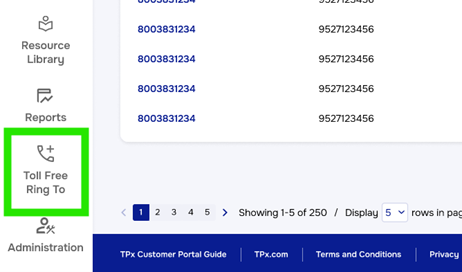
- You will see a list of your Toll-Free Numbers, along with an Action column.
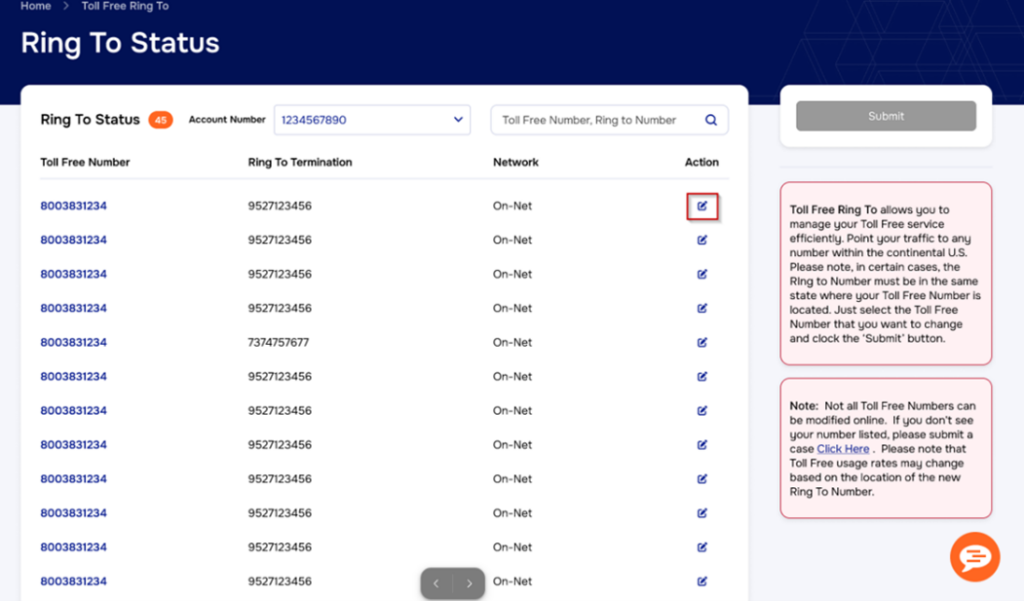
- Select the Action icon next to the number(s) you want to update. After making your selection, click the checkmark, then choose Submit.
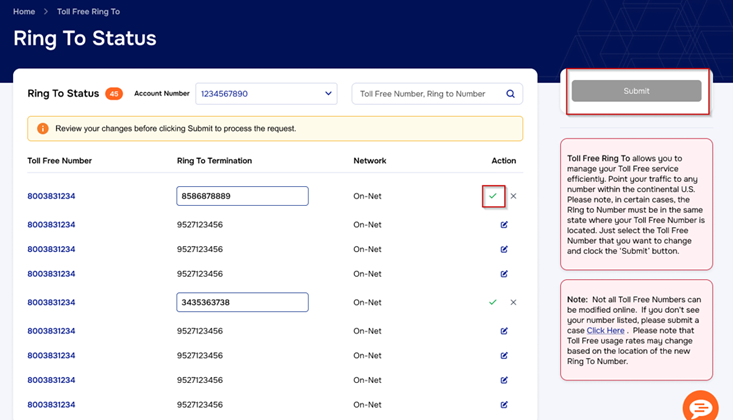
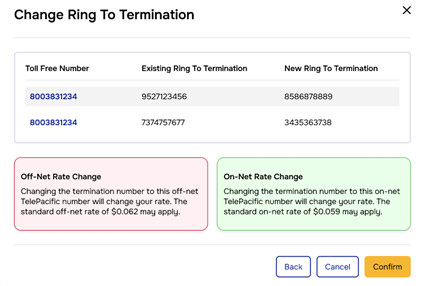
- Review and confirm your changes. Once submitted, your request will be sent for processing, and the necessary updates will be made.
Viewing and Paying Invoices
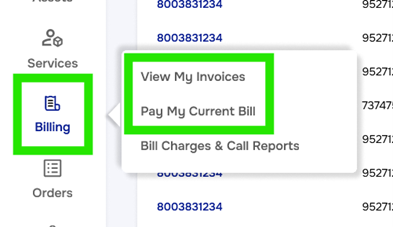
The View Invoices screen will have an updated, easier-to-read look and feel. There are no changes to how you pay your bill today. You’ll simply access invoices and payments through the TPx Customer Portal.
Billed Charges and Call Reports
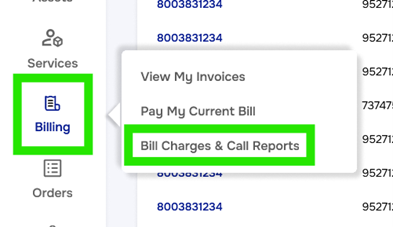
There will be no changes to how you see reports for billed charges and calls. You’ll just access it via the TPx Customer Portal.
After the transition, these tools will no longer be accessed through OneCentral Portal. If you currently use the OneCentral Portal, you’ll receive additional communications with important dates, account details, and any actions required before the transition.
What You Can Do in the TPx Customer Portal
The TPx Customer Portal is designed to
Manage Support Requests
Quickly create, track, and update support cases for:
- Technical support
- Billing and account questions
- Service changes
- New service requests
You can also:
- Add comments and attachments to cases
- Track case activity and updates
- Manage notification recipients
- Search existing cases
Access Billing Information
Eligible users can:
- View invoices
- Download billing statements
- Make payments
- Access billing charges and call reports
Get Real-Time Support
Connect with TPx support teams through:
- Live chat
- System status updates
- Resource library and user guides
Access Additional Tools
The TPx Customer Portal gives you convenient access to the tools and account management features you use most, all in one place.
Use the portal to:
- Access product-specific applications and service logins
- View and manage billing information
- Review call reports and usage details
- Submit and track support requests
- Request Toll-Free Ring-To changes
- Connect with your TPx account team
- View network status and service updates
You can also use the portal to complete routine account updates more quickly, while still having access to TPx support when you need help.
Getting Started
Existing OneCentral Portal Users
If you currently have access to OCP:
- Watch for your TPx Customer Portal activation email
- Activate your account
- Set your password and MFA preferences
Need TPx Customer Portal Access Sooner?
You can request access through our support team:
Portal Login
Access the TPx Customer Portal here:
We recommend bookmarking this URL for future access.
Security & Multifactor Authentication (MFA)
To help protect your account, the TPx Customer Portal supports Multifactor Authentication (MFA) using Google Authenticator or Okta Verify. You can manage your security settings directly within the portal.
This added layer of security helps protect your account as more tools move into the TPx Customer Portal.
Frequently Asked Questions
Do I need to create a new TPx Customer Portal account?
If you already have access to the TPx Customer Portal, you can continue using your existing account. If you have OCP billing access but do not currently have Portal access, you’ll receive an activation email with instructions to set up your account, or you can request an account today.
Will my existing support cases transfer?
You’ll continue to manage support through the TPx Customer Portal. If any action is needed for existing cases, we will communicate those details to your support case contact directly.
Who in my organization can access billing?
Billing access is available for users assigned the appropriate permissions, including Primary Authority, Alternate Authority, and Billing users.
What if I forget my password?
You can reset your password directly from the portal login page using the “Forgot Password” option.
Can multiple people from my company access the portal?
Yes. Your organization can manage multiple users and permissions within the portal.
Need Help?
We’re here to support you throughout this transition.
If you have questions or need assistance:
- Contact your TPx account team
- Open a support request
- Use live chat within the portal
Helpful Resources
- TPx Customer Portal Guide: https://www.tpx.com/support/tpx-customer-portal-guide/
- Portal Login: https://portal.tpx.com
- Support Center: https://www.tpx.com/support/open-case/
