Skip Navigation

Assign Group Services

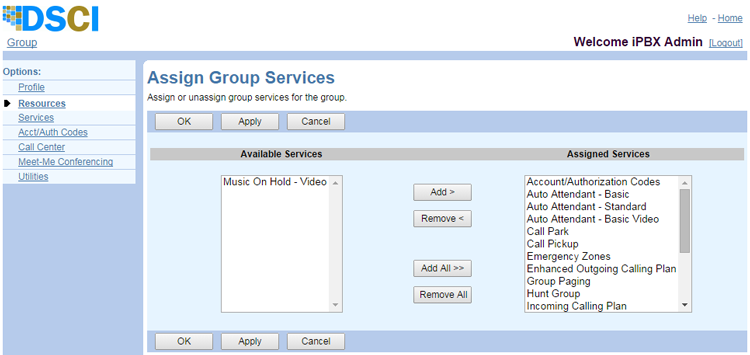
The Assign Group Services feature of the UCx Web Portal allows an administrator to add or remove features from a group.

WARNING: There are many consequences to making this type of change. Please contact TPx before you make any changes.

To view the services available for and assigned to your group:

  1. Log in to ucx.telepacific.com with your group admin credentials.
  2. Click Resources on the left menu.
  3. On the Resources page, click Assign Group Services in the Assignment column.
  4. The Assign Group Services page opens.

Admin-Assign-Group-Services

Need more help:

We’re ready to answer any of your questions. Visit our Technical Support page for phone numbers and web portal links.

For more inspiration:

Read the TPx Blog for insights that will help keep your business running at full speed.

Need more help:

We’re ready to answer any of your questions. Visit our Technical Support page for phone numbers and web portal links.

Request a Consultation

"*" indicates required fields

* By submitting this form, you are accepting TPx’s privacy policy .