
Calling Number Delivery displays the telephone number of the calling party.
To enable or disable this service for internal and/or external calls:
- Log in to ucx.telepacific.com.
- Click Incoming Calls on the left-hand menu.
- On the Incoming Calls page, click the Calling Number Delivery link in the Basic column.
- The Calling Number Delivery page opens.
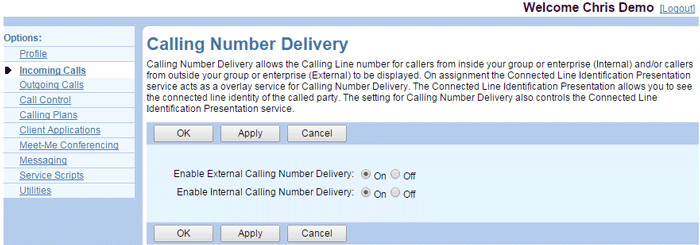
- Set Enable External Calling Number Delivery to On or Off. When set to On, Calling Number Delivery displays the phone numbers of external callers.
- Set Enable Internal Calling Number Delivery to On or Off. When set to On, Calling Number Delivery displays the phone numbers of internal callers.
- Click OK or Apply to save changes, or Cancel to exit without saving.
NOTE: If you have either Internal Calling Line ID Delivery or External Calling Line ID Delivery assigned, these services have precedence over Calling Number Delivery. The configuration of the Calling Number Delivery service has no effect in this case.