Skip Navigation

Change Your Password for Real-Time Portal

1.   Visit https://app.dsci-net.com and log in with your current User ID and Password.

2.   Click Profile at the top right.

3.   On the Update User Profile screen, click on your name. It will put a faint yellow box around the fields.
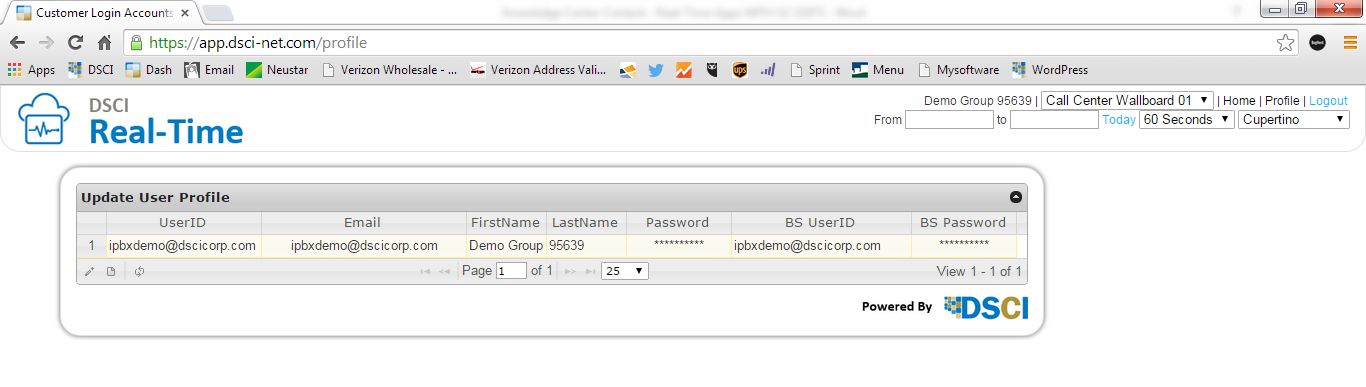
real time figure 1

4.   Click the pencil icon at the bottom left of the gray box, below the UserID field. The Edit Record window opens.

5.   Enter your new password in the Password field. Enter the same password again in the Confirm field. Click Save.
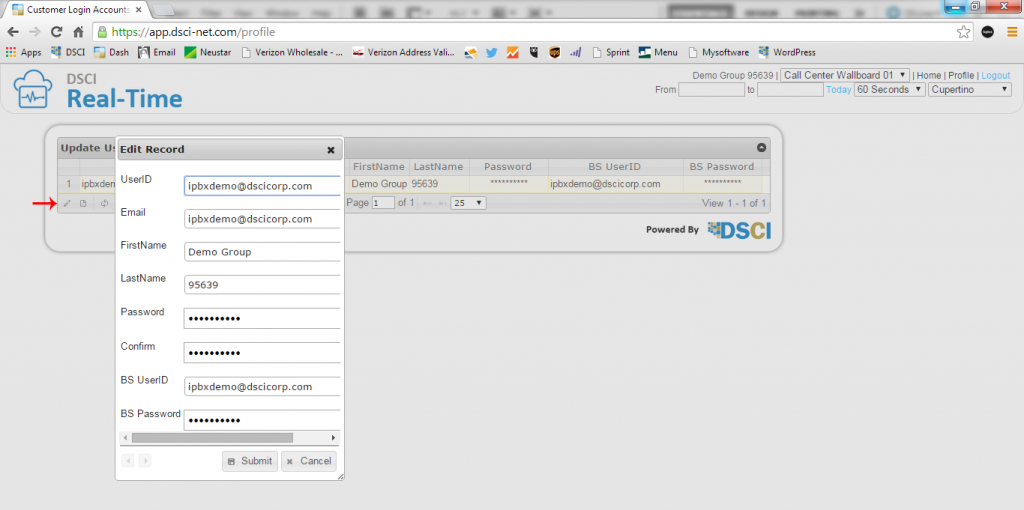
real time figure 2

NOTE: Do not modify the BS Password field.

Need more help:

We’re ready to answer any of your questions. Visit our Technical Support page for phone numbers and web portal links.

For more inspiration:

Read the TPx Blog for insights that will help keep your business running at full speed.

Need more help:

We’re ready to answer any of your questions. Visit our Technical Support page for phone numbers and web portal links.

Request a Consultation

"*" indicates required fields

* By submitting this form, you are accepting TPx’s privacy policy .