
Dash provides you the visibility and control to help make running your business easier. Update many aspects of your account. View billing data, contacts, projects, assets, services, graphs and more.
Dash Credentials
Shortly after your finalize your contract, you should receive an email with your Dash credentials. As a TPx customer, you can use the Dash Customer Web Portal (dash.tpx.com) to access and update many aspects of your account.
Dash Brochure
The following is from our Dash brochure. You can access the brochure here
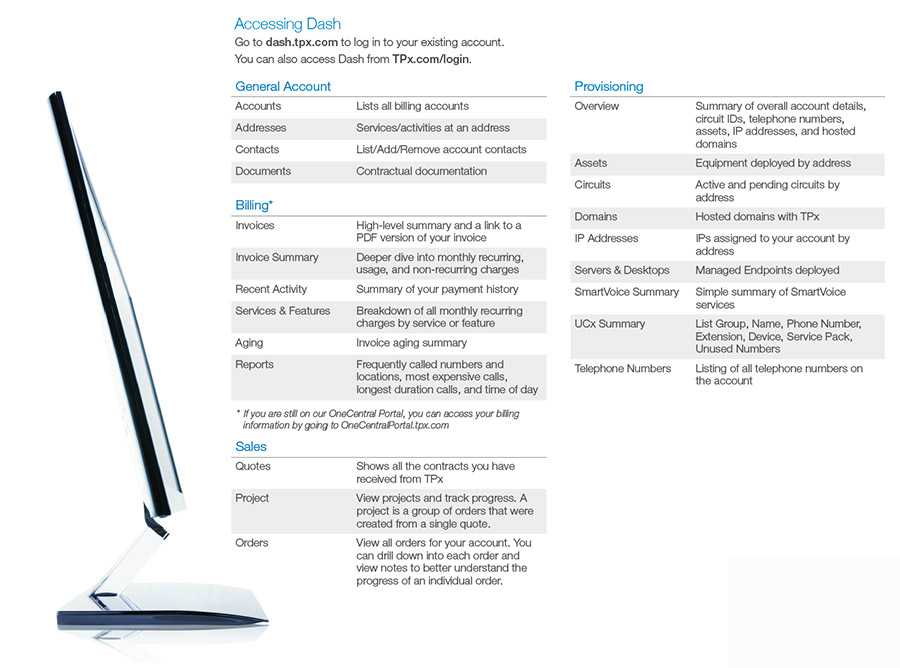 What You Can do With Dash
You can use this system to view accounts, addresses, billing data (including invoices and view related reports), contacts, projects, sold quotes, assets, circuits (along with data bandwidth graphs), domains (including DNS management), IP addresses, orders, telephone numbers and more. Additionally, you have access to add new addresses, perform basic edits of addresses, add new contacts, edit contacts (including managing Dash access for other contacts at your company), add documents to an open order, and add a new request to the system.
Learning How to use Dash
During your Project Engineer Welcome Call, you will have a Dash overview
Additional Information/Dash User Guide
For more detailed information , please go to the Dash user guide