
NOTE: To have access to these options, you must be assigned host privileges on at least one bridge.
- Log in to the UCx Web Portal at ucx.telepacific.com.
- Click Meet-Me Conferencing on the left-hand menu.
- On the Meet-Me Conferencing navigation menu, click Conferences.
- The Meet-Me Conferences page opens and displays all conferences that you have created.
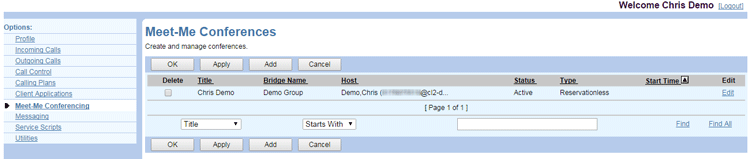
Notes on this display:
- For the reservationless type conference, the date and time are not shown. These are completed according to the conference end time defined at the system level.
- For a one-time conference, the date shown would be the start date.
- For a recurring conference, the date shown would be the next occurrence of the conference (or, if it is completed, the last occurrence).
- Conferences that are yet to occur are shown as Active, whereas those that have already been completed are shown as Completed in the Status column.
- Any conference, whether Active or Completed, would be shown as Inactive if the bridge on which this conference is created becomes inactive.
- A completed conference can be edited and rescheduled for a future date.