
View Call History
By default, call logs are grouped into Placed, Received, and Missed calls.
- In the Call Console, click Call History
 . The Call History dialog box appears displaying your past calls.
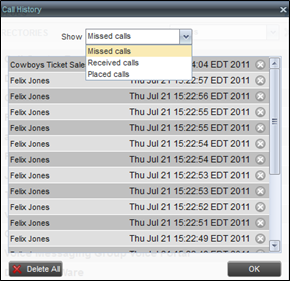
- By default, Missed calls are displayed. To show calls in another group, select that group from the Show drop-down list.
Delete Call Logs from Call History
- In the Call Console, click Call History to open the Call History dialog box.
- To delete all call logs, click Delete All.
- From the Show drop-down list, select a grouping.
- To delete a selected log, click
 next to that log.