
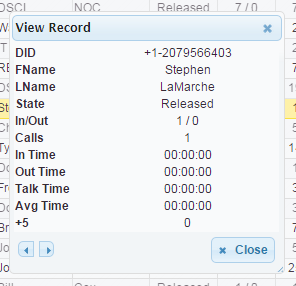
 Figure 1: View Record
The following functions are available on both the Summary Report and the Call Detail Report.
- View Selected Row: To view an individual record, click on the row and then click the
 button in the lower left corner of the report window. A View Record (Figure 1) window will open to display that record’s details. Use the left and right arrows to scroll through the records. Click Close when finished.
 - Find Records: To perform a search, open either the Summary Report or a Call Detail Report and then click the
 button in the lower left corner of the report window. A Search window will open. Input your search criteria and click Find. Close the Search window to view your results within the report. Click Reset to clear the search fields.
NOTE: Search results may clear when the data refreshes. To view the same search results again, click the button; the fields will pre-populate with your last search. Click Find to re-run the search with the same criteria. - Reload Grid: Click
 to manually refresh the report data.