
NOTE: This function is only available to users who are assigned to at least one Call Center queue.
If you are a Call Center agent, you can use the UCx for Android app to log in to your assigned queues.
View Call Queues
Tap  to open the sidebar menu, then tap
  Queues. The Queues page displays your assigned queues.
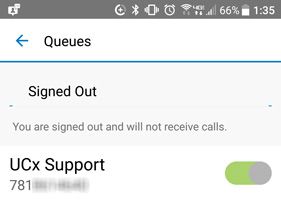
Set Automatic Call Distribution (ACD) Status
Tap the dropdown at the top of the Queues page to select your ACD state: Signed In, Signed Out, Available, Unavailable, or Wrapping Up. When you select an ACD state, the text underneath the dropdown indicates whether or not you will receive incoming Call Center calls.
Receiving Call Center Calls with UCx for Android
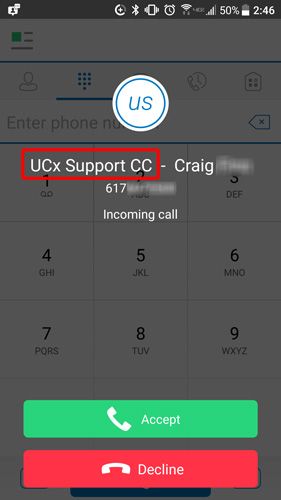
When you are logged in to a Call Center through the UCx for Android app, you’ll see a notification for each inbound call to the queue. It’s exactly the same as the notification for direct-dialed calls, except that the notification also includes the name of the queue (highlighted with a red box in the below image).
Join Call Queues
NOTE: Most Call Center agents do not need to adjust this setting, and it is commonly restricted. If you need this functionality, contact your Call Center supervisor or system administrator.
On the Queues page, tap the toggle switch next to the name of the queue you want to join. Repeat this process for each queue you want to join.