
NOTE: In some cases, a Supervisor may simultaneously be an Agent of one or more queues and need to manipulate their own ACD state. This article does not apply to Supervisors who are configured to never take incoming calls from queues.
When you sign in to the Call Center client, your ACD (automatic call distribution) state is set to the post sign-in ACD state set on the Settings page.
To manually change your ACD state:
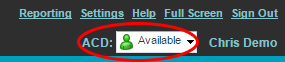
- At the top right-hand side of the main Call Center client window, click the ACD drop-down and select an ACD state from the list.
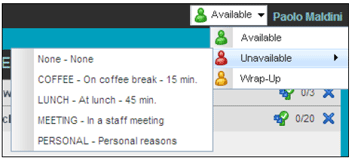
- If you select Unavailable and your company requires you to provide a reason for your unavailability, select an Unavailable Code from the drop-down list.
ACD States:
| ACD State | Icon | Description |
| Available |  |
Agent is available to receive ACD calls. |
| Unavailable |  |
Agent is unavailable to receive ACD calls. |
| Wrap-Up |  |
Agent is performing post call work. |
| Sign-In | The Sign-In state is equivalent to a “clock in”, which means that the agent is at their work location but not yet ready to accept incoming calls | |
| Sign-Out | The Sign-Out state is equivalent to a “clock out”, which means that the agent’s workday or shift is completed and they are leaving. |