
When you sign in to Receptionist or Call Center, your presence state is automatically set to Available. You can change this presence state and provide a status message to display to your contacts. The instructions are the same for both clients.
NOTE: When changing your presence Status in Receptionist and Call Center Clients, it automatically changes your status in UCx as well.
Change Your Presence State
Click the Presence box at the top right-hand side of the main window and select the new state from the drop-down list.
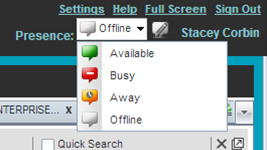
The possible states are: Available, Busy, Away, and Offline. When you are in Available, Busy, or Away states you are still considered to be online.
Set a Status Message
Click Edit  next to the Presence box. The Set IM Status dialog box appears. Enter your message and click OK.
View Your Status Message
Hover over Edit next to the Presence box. A tooltip with your current status message appears.