
The General Settings menu of the Virtual Fax admin portal allows you to select settings for incoming fax routing, rasterization, and web clients at your site.
Log in to the admin portal https://fax.tpx.net/faxadmin. Your initial view upon logging in will be of the General Settings Properties menu.
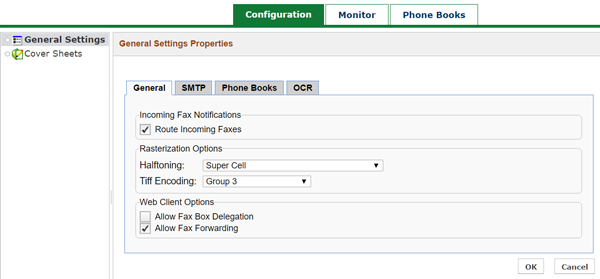
Check Route Incoming Faxes to allow sending of incoming faxes to your configured email account. This option is enabled by default. If you disable it, faxes are not delivered by email, but are still received and stored on the server; the user must log in to the web portal to receive faxes.
Rasterization Options only apply to outbound faxes. Halftoning and Tiff Encoding can be modified to change the transmission quality and corresponding file size.
NOTE: Halftoning and Tiff Encoding are both always active at the same time. Halftoning defines how the image is rasterized, and TIFF is the method of image compression. Click here for more information on this concept.
Check Allow Fax Box Delegation to allow Web Client users to delegate access to their fax account to other users. A delegate can see all of the user’s inbound faxes, and can send outbound faxes on the user’s behalf. This option is disabled by default.
Check Allow Fax Forwarding to allow Web Client users to forward faxes to other users. This option is enabled by default.