
Use this process to export a list of all Virtual Fax users for your company. The exported list includes all of the users’ properties, except for their passwords.
Log in to the admin portal at https://fax.tpx.net/faxadmin, then click Internal Users on the left menu. Click the  Export Users button.
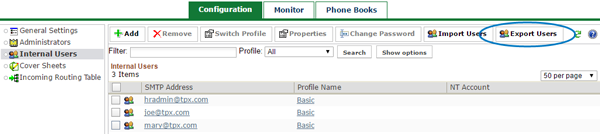
In the system dialog that appears, choose a name and location for the file (the default name is “Exported-Users.csv”) and save it.
The exported list will be a comma-separated CSV file with the following columns:
- SmtpAddress
- ProfileId
- NTAccount
- Salutation
- FirstName
- LastName
- JobTitle
- Cellular
- Pager
- BillingCode
- SubBillingCode
- Company
- Address
- City
- State
- Country
- ZipCode
- Phone
- Fax
- TimeZone