Skip Navigation

Organize Contacts in the Call Center Client

Sort Contacts

In the Call Center Client can sort contacts in the following directories: Group/Enterprise, Queues, and Agents.

  1. In the Contacts pane, click Options Receptionist - options.
  2. Select Sort, followed by the name of the directory in which you want to sort contacts, and then the sorting option.
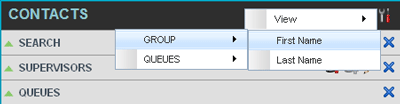
Call-Center-Contacts-Sort

NOTE: When agents are ordered by ACD state and there is a change in the ACD state of an agent, the agents are not automatically re-ordered.

Need more help:

We’re ready to answer any of your questions. Visit our Technical Support page for phone numbers and web portal links.

For more inspiration:

Read the TPx Blog for insights that will help keep your business running at full speed.

Need more help:

We’re ready to answer any of your questions. Visit our Technical Support page for phone numbers and web portal links.

Request a Consultation

"*" indicates required fields

* By submitting this form, you are accepting TPx’s privacy policy .