
Use this process to change the assigned profile for two or more Virtual Fax users. To change the profile for a single user, see Edit a Virtual Fax User.
Log in to the admin portal at https://fax.tpx.net/faxadmin, then click Internal Users on the left menu.
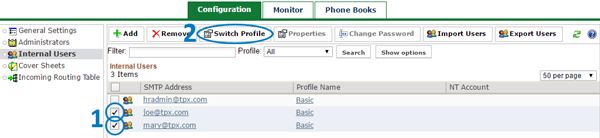
In the right panel, select all the users you want to modify. Then, click  Switch Profile. (Note: the Switch Profile button will be grayed out until you select at least two users.)
The User Properties dialog appears.
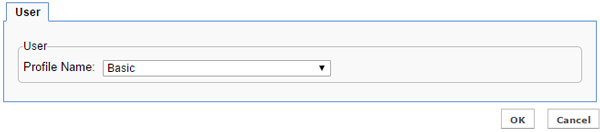
Select the Profile Name that you want to apply, then click OK. Click Cancel to exit without saving.