


Built Around Your Feedback
Managing IT shouldn’t be a hassle. You shouldn’t have to dig through emails, wait on hold, or wonder what’s happening with your ticket.
That’s why we built the TPx Customer Portal — your one secure place to see everything that matters. From tracking tickets to exploring your services, it puts clarity and control right at your fingertips.
When the portal first launched, the goal was simple: help you save time and stay in control. Since then, it’s become something even more powerful — a platform that keeps improving and growing with your needs. Every update is shaped by your feedback, with enhancements that make managing IT simpler, faster, and more intuitive every day.
“We’re constantly looking for ways to make the portal more intuitive and useful,” says Zachary McKee (Product Manager, Portal and Shared Services). “Many of our updates come directly from customer conversations and support requests.”
Your Challenges, Solved in the TPx Portal
Every business faces unique IT challenges, but most come down to the same frustrations: limited visibility, slow communication, and too many tools to manage. The TPx Customer Portal was built to solve exactly that. Here is how it helps.
Challenge #1: “I just want to know what’s happening with my ticket.”
Solution: Real-time updates, all in one place.
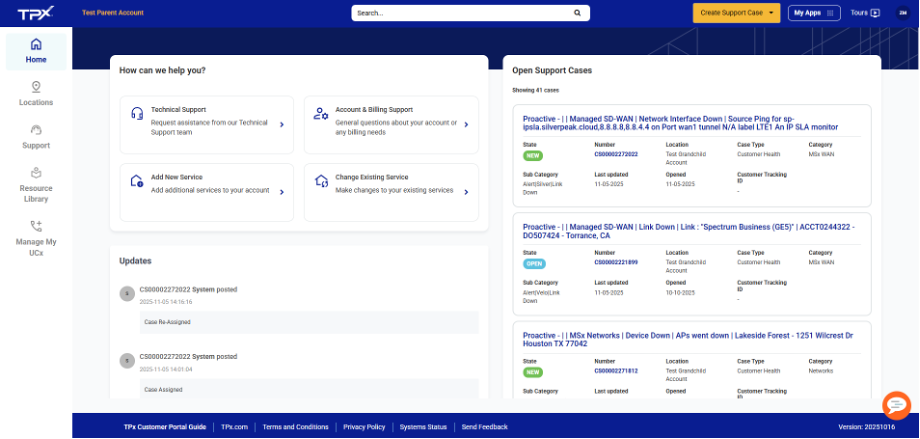
No more guessing games or digging through your inbox. The TPx Portal shows the real-time status of every support ticket along with notes, timestamps, and technician updates.
You can even add your own comments or upload attachments directly in the portal to keep everything organized and easy to follow.

Challenge #2: “I need fast access to billing, services, and reports.”
Solution: One login that gives you complete visibility.
The TPx Customer Portal gives you a real-time view of your entire service environment. You can quickly see all active services, check their status, and track open cases or orders—all in one secure place. No more digging through emails or switching between tools.
Coming Soon: A new billing and reporting feature will launch next year. It will let you view invoices, check payment history, and download billing details right from the portal, giving you even more visibility and control.
The portal already helps you manage daily tasks in seconds, and soon, it will put your billing insights right alongside your service data for a complete view of your TPx experience.

Challenge #3: “I manage multiple locations or users, and it is hard to keep track.”
Solution: A big-picture view of your entire organization.
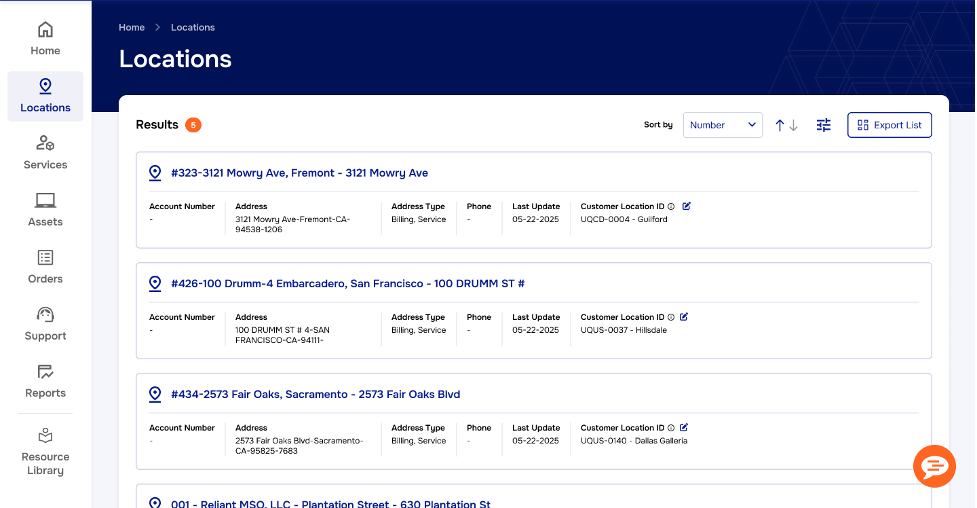
Whether you oversee one office or fifty, the TPx Customer Portal keeps everything connected. You can view all your locations, users, and services from one clean dashboard.
Role-based access ensures your team sees exactly what they need. No clutter. No confusion. No wasted time.
Challenge #4: “I need help right now.”
Solution: 24/7 access to the TPx support team.
Need to open a ticket or escalate an issue? You can do it right from your dashboard. The built-in chat feature connects you directly with a TPx technician whenever you need help.
Because every interaction is logged, you will always have a clear record of updates and resolutions. That means fewer surprises and faster results.

Always Evolving with You in Mind
The TPx Customer Portal keeps getting better, and that’s by design. Every update is driven by your feedback, helping us make the platform faster, smarter, and easier to use. Coming soon: a shorter, easier-to-remember URL that makes logging in even easier.

“Our goal is to make it effortless,” says Bryan Tosi (Product Owner, Managed Shared Services). “Customers shouldn’t have to think about how to get what they need. It should just be there, ready when they are.”
That is “your sidekick for smart IT” in action: We make sure your tools work as hard as you do.
Log In and Explore
Your time is valuable, and the TPx Customer Portal was built to help you make the most of it.
Log in to explore your dashboard, check your tickets, and see what’s new.
