
OCR Processing creates a searchable PDF, in which a transparent layer of text is laid on top of the fax image. This does not add any discernable length of time to the processing of an inbound fax.
To configure OCR Processing, log in to the admin portal at https://fax.tpx.net/faxadmin. Your initial view upon logging in will be of the General Settings Properties menu. Click the OCR tab.
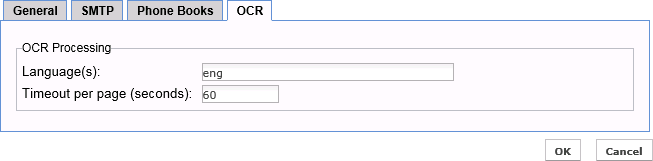
| Controls | Description | Default |
| Language(s) | Languages (libraries) that will be used to recognize words during OCR processing.
Languages must be specified using 3-digit codes (as per ISO 639-2), separated by a plus (+) sign. For example: eng+fra+deu for English, French and German. (Click here for a list of the 3-digit country codes from ISO 639-2.) NOTE: Specifying several languages will increase the OCR processing time. |
(Language used at server installation) |
| Timeout per page (seconds) | Maximum time allowed for the OCR engine to process a single page. | 60 |