
Basic Call Logs display your most recently received, missed, and placed calls.
- Log in to the UCx Web Portal at ucx.telepacific.com.
- Click Utilities on the left-hand menu.
- On the Utilities page, click the Basic Call Logs link.
- The Basic Call Logs page opens.
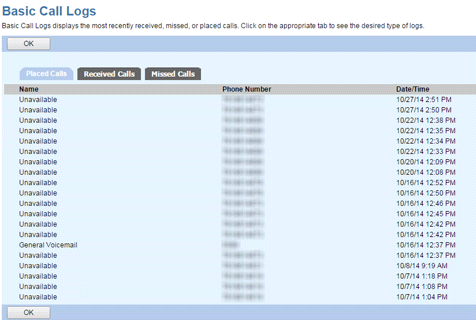
- Click on a tab to see your call logs:
- Placed Calls: Displays your most recent outgoing calls.
- Received Calls: Displays the most recent incoming calls that you answered.
- Missed Calls: Displays the most recent incoming calls that you did not answer.
- When finished, click OK to close the call logs.
The following information is displayed for each call log:
- Name: The name of the person you called or that called you.
- Phone Number: Phone number of the person you called or that called you.
- Date/Time: The date and time you placed or received the call. For missed calls, it indicated the date and time when the call was placed.